In every year lot of people spend million of dollars to buy licenses software. Why is that? There are huge collections of GPL software (GPL - General Public License) from operating system to simple photo editor available. Download & install it today, see the difference save your money….

Thursday, February 16, 2012

VLC media player


VLC is a free and open source cross-platform multimedia player and framework that plays most multimedia files as well as DVD, Audio CD, VCD, and various streaming protocols. 

Features 

* Simple, Powerful and Fast
* Plays everything, Files, Discs (DVD, CD, VCD, Blu-Ray), Webcams and Streams
* Plays most codecs with no codec packs needed:
* MPEG-2, H.264, DivX, MPEG-4, WebM, WMV player
* Completely Free, 0 Spyware, Ads or User Tracking
* Works on most platforms: Windows, Linux, Mac OS X, Unix...
* Media Converter and Streamer


Wednesday, December 14, 2011

OpenBSD


Rumor has it that Theo de Raadt, the venerable NetBSD developer forked this Distribution from NetBSD because of personality clashes. However, some like to believe that the reason was more technical since Theod de Raadt wanted to focus on security, open source nature, documentation, code quality, etc. As a result OpenBSD is called the most secured OS in the world, since it implements certain security features which others tend to ignore. In fact, OpenBSD’s logo is a Blowfish, the name of the popular security cipher.
Apart from the ones mentioned above there are more BSDs like DesktopBSD, DragonFlyBSD and a few other commercial, propreitary BSDs, but I think we have covered enough for one post.


Monday, November 28, 2011

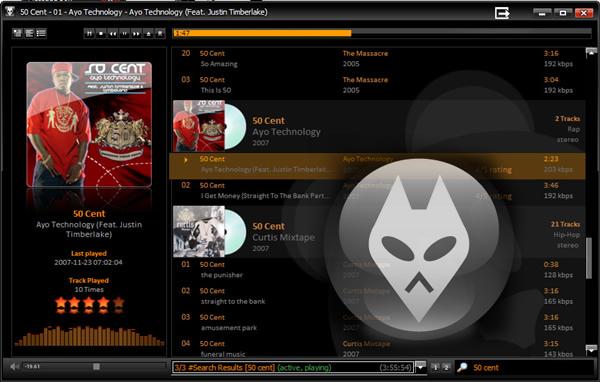
Foobar2000


foobar2000 is an advanced freeware audio player for the Windows platform. Some of the basic features include full unicode support, ReplayGain support and native support for several popular audio formats.
  • Supported audio formats: MP3, MP4, AAC, CD Audio, WMA, Vorbis, FLAC, WavPack, WAV, AIFF, Musepack, Speex, AU, SND... and more with additional components.
  • Gapless playback.
  • Full unicode support.
  • Easily customizable user interface layout.
  • Advanced tagging capabilities.
  • Support for ripping Audio CDs as well as transcoding all supported audio formats using the Converter component.
  • Full ReplayGain support.
  • Customizable keyboard shortcuts.
  • Open component architecture allowing third-party developers to extend functionality of the player.


Wednesday, November 23, 2011

Darwin


Darwin is the UNIX technology-based foundation of Mac OS X. Darwin integrates several technologies. Among the most important are 4.4BSD-based operating-system services (built on the Mach 3.0 microkernel), the I/O Kit, networking facilities, and support for multiple integrated file systems. Developers can use Darwin to port UNIX/Linux applications and create kernel extensions.

In addition to being part of Mac OS X, Darwin is a standalone, BSD-based operating system. (BSD, short for Berkeley Software Distribution, is a family of UNIX variants descended from Berkeley’s version of UNIX.)Darwin is also occasionally used to refer to the Darwin Streaming Server, also known as the QuickTime Streaming Server (QTSS).


OpenSolaris

OpenSolaris is an operating system (OS), an open source project licensed under CDDL, and a community. The project’s goals are innovation, collaboration, and the extension of OpenSolaris technology.OpenSolaris is free, open source, and well-suited for desktops, laptops, servers, and data centers. The quality requirement of OpenSolaris is perhaps best stated as Production Ready All The Time.

OpenSolaris technical communities maintain kernel and userland consolidations and launch new technology projects. OpenSolaris is developed by communities working in the different projects. Each project focuses on one or more specific areas of the system. The OpenSolaris developer project is sponsored by Sun Microsystems, Inc.


React OS


ReactOS is a free, modern operating system based on the design of Windows® XP/2003. Written completely from scratch, it aims to follow the Windows® architecture designed by Microsoft from the hardware level right through to the application level. This is not a Linux based system, and shares none of the unix architecture.

ReactOS had its origins in an older project known as FreeWin95. FreeWin95 aimed at being binary compatible with Microsoft® Windows® 95. It was founded by Yannick Majoros around 1996. But the development never took off substantially due to endless talks on design and thoughts of following the NT architecture.

The main goal of the ReactOS project is to provide an operating system which is binary compatible with Windows. his will allow your Windows applications and drivers to run as they would on your Windows system. Additionally, the look and feel of the Windows operating system is used, such that people accustomed to the familiar user interface of Windows® would find using ReactOS straightforward. The ultimate goal of ReactOS is to allow you to remove Windows® and install ReactOS without the end user noticing the change.Please bear in mind that ReactOS 0.3.7 is still in alpha stage, meaning it is not feature-complete and is not recommended for everyday use.


RxDOS

RxDOS is a fast MS-DOS clone that supports very large disk drives, FAT32 volumes, and Windows 95/98 Long Filenames. its source code is also available free at sourceforge.


FreeDOS


FreeDOS aims to be a complete, free, 100% MS-DOS compatible operating system (mostly achieved except Windows compatibility – Windows standard-mode works on FreeDOS, but 386-mode / WfW 3.11 does not.)

These days, there are three main uses for FreeDOS:
  1. Running classic DOS games
  2. Running business software that only supports DOS
  3. Supporting embedded DOS systems, such as a computerized cash register or till
FreeDOS should run on any standard PC, but if you are new to DOS, we recommend you use a PC emulator to install and boot FreeDOS. You can find PC emulators for all computer platforms (Windows, Linux, Mac.) You can even run FreeDOS using a PC emulator written in Java, right in your web browser!


EditPad Lite


EditPad Lite is a general-purpose text editor, designed to be small and compact, yet offer all the functionality you expect from a basic text editor.

You can open as many files in EditPad at a time as you want and change between the open files by clicking on their tabs. It has unlimited undo/redo and you can even undo changes after saving files. Its block functions allow you to save parts of your text to disk and insert a file in the current text. EditPad puts an icon in the system tray that remains visible, even if EditPad is closed. This way you have easy and fast access to EditPad, without the need to keep it running all the time. If you don't like this behavior, you can, of course, disable this feature and make EditPad behave like a normal Windows application.

EditPad fully supports double byte character systems (DBCS) so you can edit texts written in Far East languages, such as Chinese, Japanese or Korean, as easily as those written in European languages. Many settings such as word wrap, line numbering and auto indent can be made for each file type individually. You could activate word wrap but not auto indent when editing a plain text file, and just the other way around when editing source code. You can also define your own file types which will be used to build the filters for open and save dialog boxes.


Page Plus SE


Pageplus SE is a free layout program that can help you produce your own printed materials. You get a range of templates, which quickly can be turned into business cards, brochures, posters, banners, invitations, menu cards etc. You can also choose to make your own template and use it. With the commercial market leaders, QuarkXpress and Indesign, asking many hundreds of dollars, PagePlus offers a viable free alternative. A great program for a small business corporation or the home enthusiast.


WordWeb


WordWeb is a one-click English thesaurus and dictionary for Windows that can look up words in almost any program. It works off-line, but can also look up words in web references such as the Wikipedia encyclopedia. The software has a full dictionary and thesaurus for American, British, Canadian, Australian, Indian, and global English.

Features include:
  • Definitions and synonyms, including related words
  • 150 000 root words
  • 120 000 synonym sets
  • 5000 audio pronunciations
  • Look up words in almost any program


Jarte


Jarte is a free word processor that is compatible with Microsoft Word and can read and save files in Word format. It can also do rich text, PDF or HTML. The first thing that struck me about Jarte was the interface. The interface looks very slick but is very easy to use and customizable in several ways. You can switch back and forth between minimum, compact, and classic views by the click of a button.

Jarte does some stuff in an original way. The screen capture, for example, allows you to select any area on your desktop to capture and paste into Jarte. Or the fact you can just save your documents to PDF, no questions asked. One of my main big gripes about programs like Word (other than the price) is that I can't easily find features that I need to use. Jarte solves this by placing some buttons across the top that show the stuff you need just by hovering over them. Very nice.


PDF Printer


The Bullzip PDF Printer works as a Microsoft Windows printer and allows you to write PDF documents from virtually any Microsoft Windows application. 

This program is FREEWARE with limitations, which means that it is FREE for personal and commercial use up to 10 users. It does not contain any advertising or popups. For commercial applications with more that 10 users there is a commercial version of the product

Features

  • Print to PDF from almost any Windows program.
  • Runs on Microsoft Windows 2000/XP/XP x64/2003/2003 x64/Vista/Vista x64/2008/Windows 7.
  • Supports 64-bit operating systems.
  • Direct output to the same file each time or prompt for destination.
  • Control if the printer should ask if you want to see the resulting PDF document.
  • Control output and prompts programmatically.
  • Setup can run unattended.
  • Graphical user interface.
  • Password protect PDF documents.
  • 128/40 bit encryption.
  • Quality settings (screen, printer, ebook, prepress).
  • Set document properties.
  • Watermark text, size, rotation, and transparency.
  • Superimpose/background documents.
  • Appending/prepending documents.
  • User interface control.
  • Command line interface to all settings.
  • COM/ActiveX interface for programmatic control.
  • Support for Citrix MetaFrame
  • Support for Windows Terminal Server
  • Multiple output types supported: BMP, JPEG, PCX, PDF, PNG, and TIFF.

Monday, November 21, 2011

KM Player


KM Player is a lightweight audio and video player for Windows that supports a wide range of different file formats, including AVI, ASF, WMV, AVS, FLV, MKV, and many more.

Choosing a multimedia player used to be a real no-brainer. However, during recent times the raft of new features and updates added to classic media players like Winamp, Windows Media Player, and even iTunes have left the apps increasingly bloated. For those looking for a fresh alternative to these ballooning apps, KMPlayer could be your ticket.


LookInMyPC


LookInMyPC generates a complete, comprehensive system profile that includes information on all installed hardware and software. Additionally it provides system diagnostic information such as details on running processes, installed services, startup programs, Windows updates and hot fixes, active network and Internet connections, TCP/IP port usage, event log detail, and much more. All this is provided in an easy to read, formatted report that you can view and print using your web browser


LookInMyPC is free for personal, business, and professional use. Any public redistribution is prohibited without prior approval.


Free Download Manager


Free Download Manager is a powerful, easy-to-use and absolutely free download accelerator and manager. Moreover, FDM is 100% safe, open-source software distributed under GPL license


Any Video Converter


Any Video Converter Free version is an All-in-One video converting tool with easy-to-use graphical interface, fast converting speed and excellent video quality. It allows you to effortlessly convert video files between every format! This free version supports DVD NTSC, DVD PAL, MPEG-I, MPEG-II, MPEG-4 and Flash FLV video profiles.


PC Decrapifier


Is your PC running slow? Even brand new PCs often come with LOTS of pre-installed software that can cause that new machine to come to a crawl. Not to mention all of the annoying pop-ups! Others may have a PC that's a couple years old and we're the ones that installed a bunch of junk! It happens to the best of us. We try a bunch of programs over time and forget to remove them.


Comodo - Firewall for Windows

Firewall and Antivirus software work together to keep your PC safe from viruses and Hackers.

System Requirements:
  • 32-bit Windows 7 /
    Vista / XP SP2
  • 128 MB RAM
  • 250 MB hard disk space


BurnAware


BurnAware Free is a full-fledged disc burning tool – fast, lightweight, feature-packed and, most importantly, 100% free. The program burns all types of CD, DVD and Blu-Ray discs containing data, digital photos, music and video. With BurnAware Free, you will be able to create bootable or multisession CDs and DVDs, high-quality audio CDs, make and burn disc images, copy and backup discs.
The software supports the most popular Windows versions, including NT/2000/XP/Vista/7 (32 and 64-bit) and does not require the .NET framework to operate.